In today’s world, LLMs have found use cases for automation across all industries. Their ability to be finetuned for custom use cases is truly powerful. I experimented with fine-tuning two popular LLMs, OpenAI’s GPT 4o-mini and Meta’s LLaMA 3 8B, for automating the task of shape creation in google slides based on user prompt. This project is aimed at exploring how each model generates shapes dynamically in google slides, compare the models’ performances and assess which one is the better fit for this task.
Objective
The objective of this project is to enable the LLMs to understand user prompts such as “Draw a square at the center of the slide” or “Draw 2 concentric circles and fill them with gradient green” and generate a javascript requests parameter that can be used to call the Google Slides BatchUpdate API.
High level working
The two main parts of this project are:
- Prompt Engineering and Finetuning GPT and LLaMA on custom data
- Integrating Google Slides and GPT/ LLaMA
Prompt Engineering
Before crafting a dataset and finalizing the prompt to retrain ChatGPT, I tried out a few different prompts to analyze which prompts work the best and what things need to be clarified to get the best results.
Initial Prompt
I started with the most basic prompt.
Prompt 1
“You are a Google Appscript developer. Write Javascript code to draw a circle at the center of the slide.”
Output:
The response provided an entire JavaScript function to achieve the task. The code was working as expected, but creating and retrieving an entire function from OpenAI API to Google Slides wouldn’t have been possible. The only way of creating shapes in Slides using code provided by OpenAI is using the BatchUpdate API.
This result highlighted the importance of mentioning output expectation as a JSON file in the prompt.
Realizing the importance of specifying output format, I moved to prompts that emphasized JSON responses.
Prompt 2:
“You are a Google Appscript developer. Generate the requests parameter for calling BatchUpdate API to draw a circle at the center of the slide for Google Slides API.”
Output:
The model returned a JSON object, but it lacked details needed for precise API integration. Fields such as objectId and unit specifications were either missing, incorrect or duplicate.
This phase showed that to get an API-ready JSON output, I needed to be even more explicit in defining the parameters required for a valid API call.
In the next iteration, I included more guidance on the API’s requirements, emphasizing details like objectId and using specific units for position and size.
Prompt 3:
“You are a Google Appscript developer. Generate the requests parameter for calling BatchUpdate API to draw a circle at the center of the slide for Google Slides API. The objectId should be unique. Use PT units for all measurements”
Output:
This time, the model wrote a code that included the objectId and positioned the circle at the center, using PT units for all dimensions. However, it included extra text before and after the JSON object, which would interfere with direct API calls.
It became apparent that directing the model to produce JSON exclusively without additional text was crucial for seamless API use. Finalized Prompt: Achieving Consistent API-Ready Output After refining the prompt structure and specifying exact requirements, the final prompt looks like:
Final Prompt:
“You are a Google Appscript Developer. Give me the requests parameter for calling the BatchUpdate API to draw a circlude at the centre of the slide. Use a unique objectId for each createShape request. Use PT units when building the requests. Return the output in JSON object only. Do not return any other text.”
A more generalized prompt for dynamic code generation: “Give me the requests parameter for calling the BatchUpdate API to perform the given action. Use a unique objectId for each createShape request. Use PT units when building the requests. Return the output in JSON object only. Do not return any other text. Action: Draw a circle at the center of the slide.”
Fine-tuning
The next step was to generate the dataset for finetuning the model. Both ChatGPT and LLaMA use json files for finetuning.
1. ChatGPT
Example:
{
   "messages": [
      {
         "role": "system",
         "content": "ShapesGPT is a google appscript developer bot"
      },
      {
         "role": "user",
         "content": "Give me the requests parameter for calling BatchUpdate API to perform the given action. Use unique objectId for each createShape request. Use PT units when building the requests. Return the output in JSON object only. Do not return any other text. Action: Draw a circle at the centre of the slide"
      },
      {
         "role": "assistant",
         "content": "{ \"requests\": [ { \"createShape\": { \"objectId\": \"circle_1\", \"shapeType\": \"ELLIPSE\", \"elementProperties\": { \"pageObjectId\": \"slide_1\", \"size\": { \"height\": { \"magnitude\": 200, \"unit\": \"PT\" }, \"width\": { \"magnitude\": 200, \"unit\": \"PT\" } }, \"transform\": { \"scaleX\": 1, \"scaleY\": 1, \"translateX\": 250, \"translateY\": 100, \"unit\": \"PT\" } } } } ] }"
      }
   ]
}
Output explanation:
Google Slides’ BatchUpdate API uses a series of requests in an array to perform multiple actions on a slide. Here, the array contains one request to create a shape.
- “createShape” Object: “createShape” is the action we want Google Slides to perform. This action creates a new shape on the slide.
- “objectId”: “objectId” specifies a unique identifier for this shape.
- “shapeType”: “shapeType” is set to “ELLIPSE”, which represents a circle in this context when height and width are equal. This allows flexibility, as the model can create circles, rectangles, or other shapes based on this property.
- “elementProperties”: “elementProperties” contains details on how the shape is positioned and sized on the slide, as well as which slide the shape is added to.
- “pageObjectId”: This ID, like “slide_1”, targets a specific slide within the presentation where the shape will appear.
- “size”: Defines the dimensions of the shape.
- “transform”: Defines the position and scale of the shape on the slide. Setting scaleX and scaleY to 1 keeps the shape at its original size, while translateX and translateY determine its position. PT units, used here, ensure consistency with Google Slides’ coordinate system.
GPT-4o-mini model was finetuned on a dataset that corresponded to the above example. It contained 15 examples.
2. LLaMA
The LLaMA 3 8B parameter is used due to its balance of performance and memory efficiency. The Unsloth library is used to streamline finetuning by supporting parameter-efficient fine-tuning (PEFT) with LoRA (Low-Rank Adaptation). Here’s what’s being utilized:
4-Bit Quantization: Reduces model precision to 4 bits, maintaining essential accuracy while significantly decreasing memory usage.
-
LoRA Layers: Specific model layers are adapted during fine-tuning, focusing on attention mechanisms. These layers help the model learn from limited data and adapt without full retraining.
-
Gradient Checkpointing: By recalculating activations as needed, this method saves memory during fine-tuning, ideal for larger models on smaller hardware setups.
-
LoRA Configuration: Parameters like lora_alpha, dropout rate, and rank (r) adjust the learning rate and regularization, balancing fine-tuning speed and stability.
The training data for LLaMA looks like:
{
        "instruction": "You are an expert google appscript developer. Give me the requests parameter for calling BatchUpdate API to perform the given action. Use unique objectId for each createShape request. Use PT units when building the requests. Return the output in JSON object only. Do not return any other text.",
        "input": "Action: Draw a circle at the centre of the slide",
        "output": "{\"requests\":[{\"createShape\":{\"objectId\":\"circle_1\",\"shapeType\":\"ELLIPSE\",\"elementProperties\":{\"pageObjectId\":\"slide_1\",\"size\":{\"height\":{\"magnitude\":200,\"unit\":\"PT\"},\"width\":{\"magnitude\":200,\"unit\":\"PT\"}},\"transform\":{\"scaleX\":1,\"scaleY\":1,\"translateX\":250,\"translateY\":100,\"unit\":\"PT\"}}}}]}"
    }
Integrating Google Slides and GPT/ LLaMA
- The trained model API can be integrated into Google slides using Apps Script.
- Users can access the Google Slides interface and use the “Set API Key” option in the toolbar to securely input and save their OpenAI API key using Google Apps Script PropertiesService. This ensures the API key is stored securely and only accessible within the script.
- The user selects “Draw” from the toolbar menu and describes their requirement in plain language, such as “Draw a circle at the center of the slide.”
- This input is captured by the Google Apps Script function.
- To ensure high-quality results, the program takes the user input and applies prompt engineering techniques. It enhances the input by adding contextual information to make the model’s response more precise.
- The enhanced prompt is sent to OpenAI’s API using a POST request.
- The API responds with a JSON object containing the instructions for drawing the shape.
Results
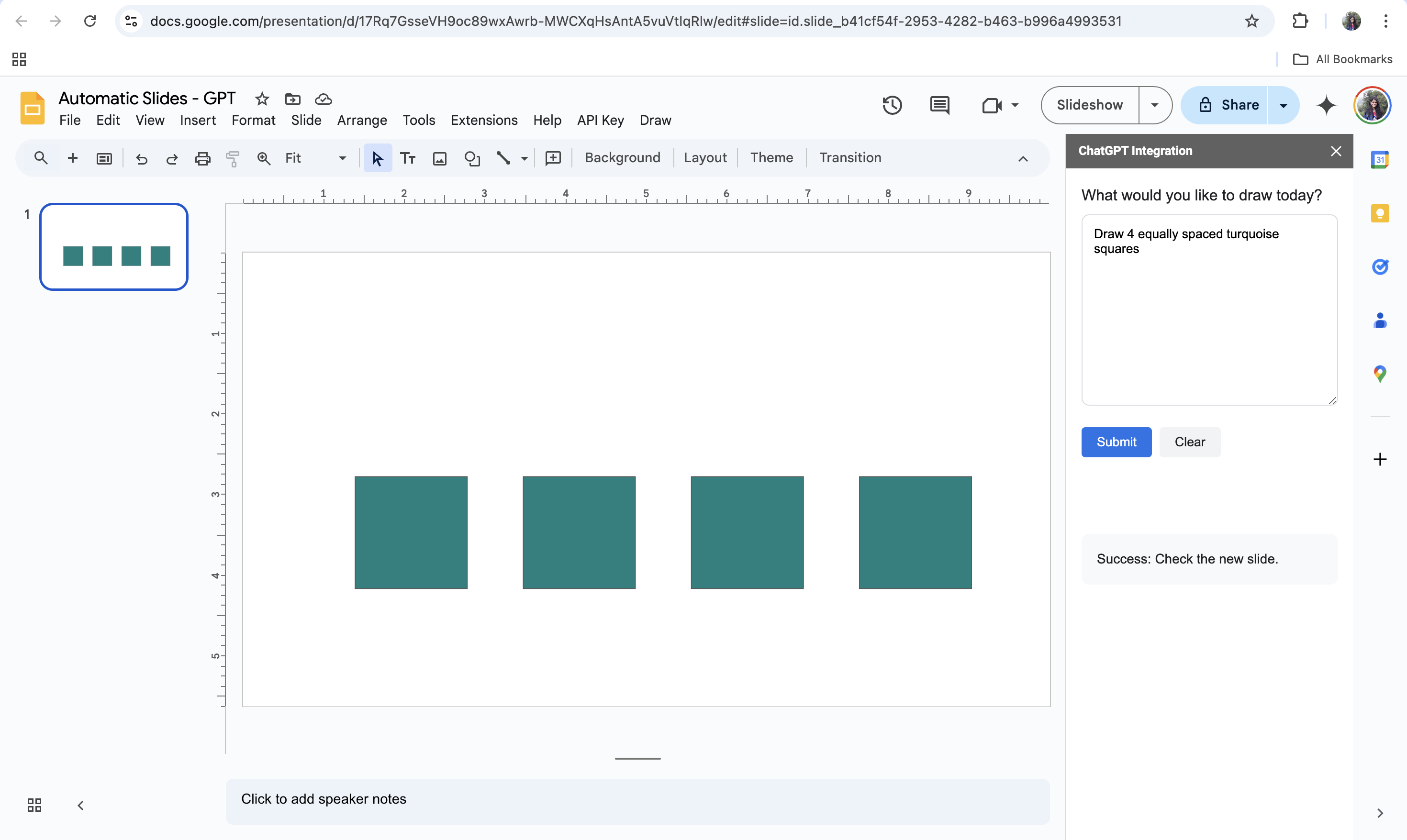
Prompt: Draw 4 equally spaced turquoise squares.
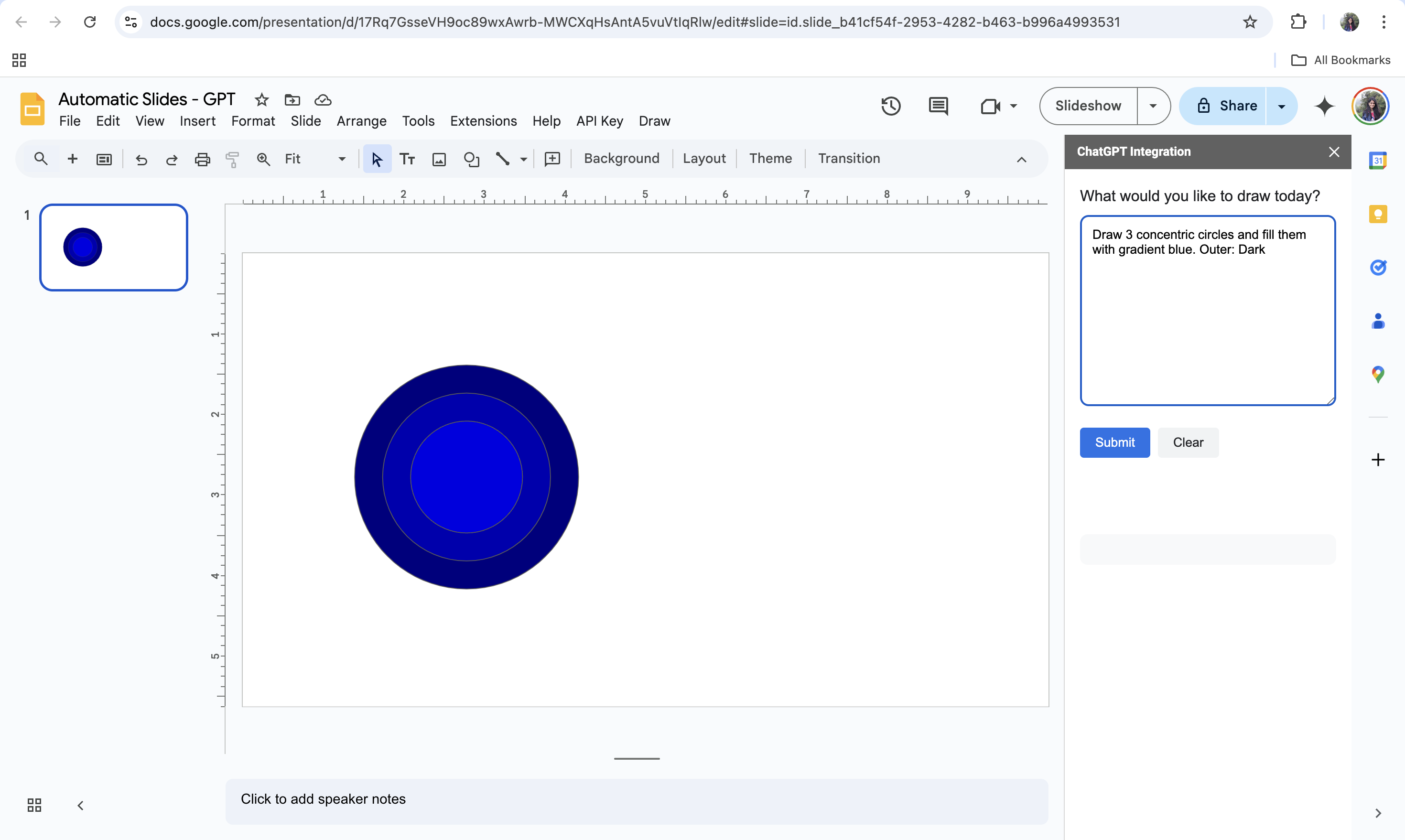
Prompt: Draw 3 concentric circles and fill them with gradient blue. Outer: Dark.
GPT vs LLaMA
| Parameter | GPT(4o-mini) | LLaMA 8B |
|---|---|---|
| Performance | High-quality, precise. Ideal for complex drawing complex shapes/ patterns | Good for simpler tasks but may not perform well for complex shapes/ patterns |
| Speed | Slower inference times | Faster and more efficient |
| Cost | Higher | Open source |
Conclusion
In conclusion, both LLaMA 3 (8B) and GPT-4o-mini demonstrate their strengths while generating shapes for google slides, but their performance varies based on specific use cases. LLaMA 3 (8B), with its optimized efficiency and open source nature, proves to be a good choice for tasks where the complexity of prompts is minimal. On the other hand, GPT-4o-mini excels in handling nuanced and detailed prompts, offering more accurate outputs for complex patterns.